
Export configuration
The functionality enables exporting data (price lists, etc.) in the desired format (JSON, CSV, XML, etc.) which is specified as a template. This is useful when products with prices, stock, pictures, etc., should be exported in the structured format for external services, such as online stores or ERP systems.
Supported templates:
- Mimovrste
- BigBang
- BigBang - discounted price
- EnaA
- Shoppster (Instructions)
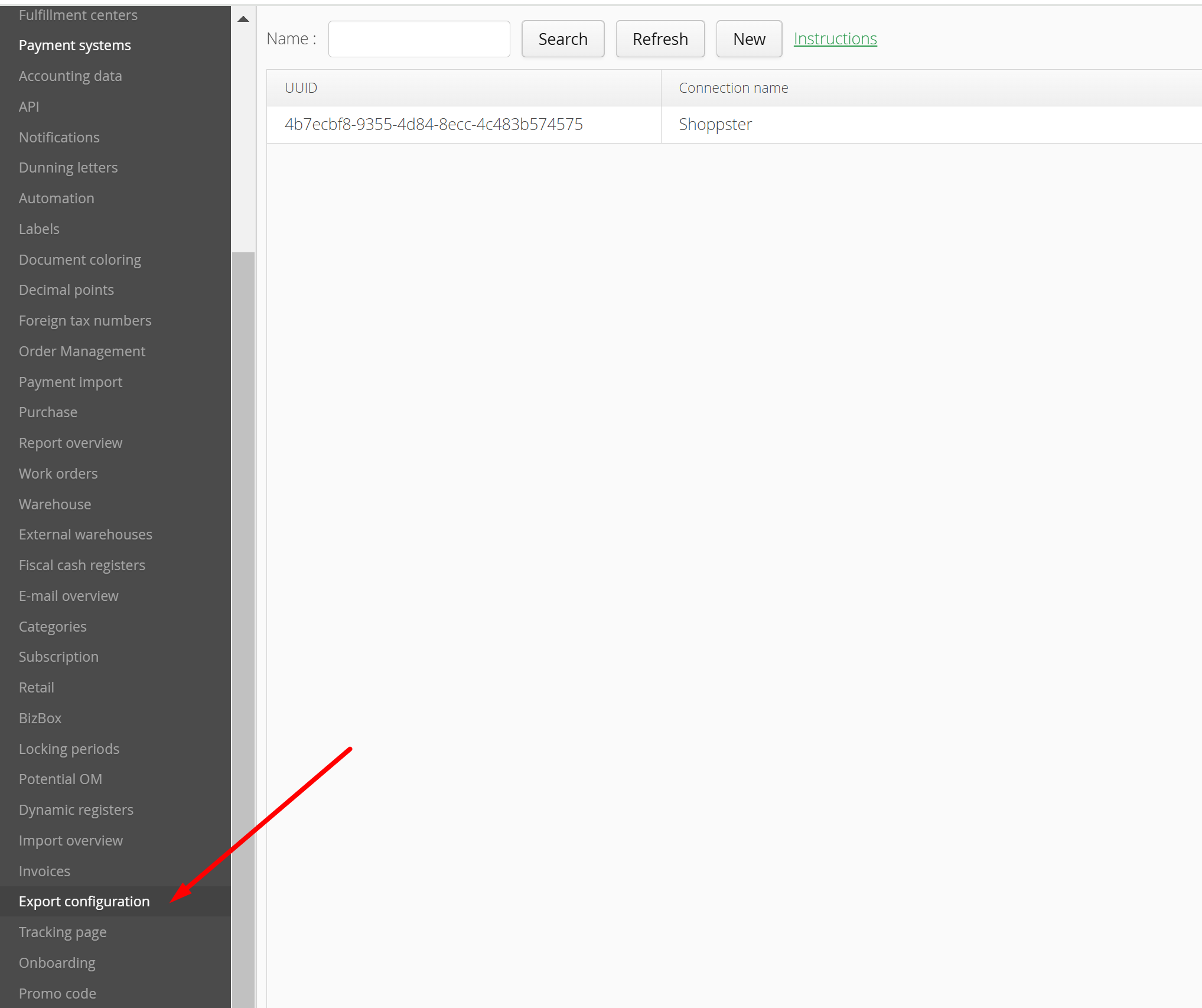
An example of a new definition
Example - BigBang:
- Pre-preparation (the existing products, price lists, and warehouses can be used):
- In MetaKocka if no products that should be exchanged with BigBang are added, create them.
- Create the sales price list, which will be valid for exchange with BigBang, if such a price list still exists
- Create a new warehouse if such a warehouse will be valid for exchange, otherwise use the existing warehouse
- In Additional settings -> Export configuration -> click on the ''New'' button
- Select the "BigBang" template and confirm it with the ''Add'' button
- In the configuration, select the price list that will be valid for BigBang and the warehouse that will be used, and then save.
- If the URL is opened, the products will not be displayed, since the required parameters are not filled in.
- The requested parameters for products should be filled in:
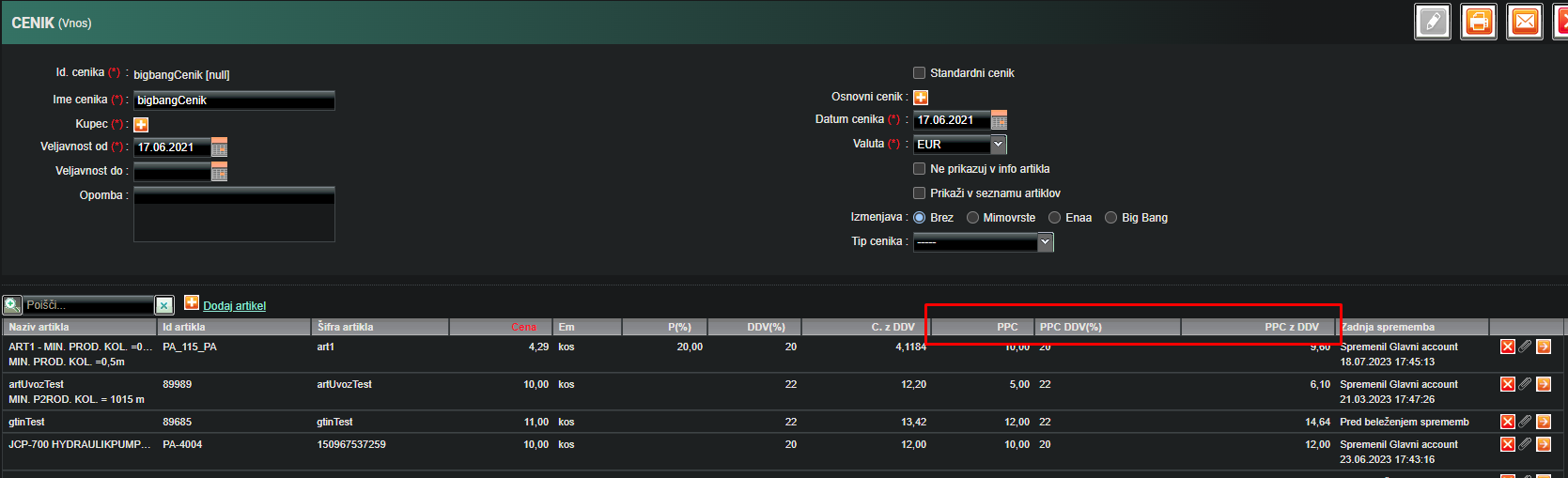
- Additional PPC columns should be displayed on the price list. PPC should be filled in and tax should be set.
- Select the product category and enter the brand.
- Additional PPC columns should be displayed on the price list. PPC should be filled in and tax should be set.
- Now, if the URL is opened again, the products will be displayed.
Settings
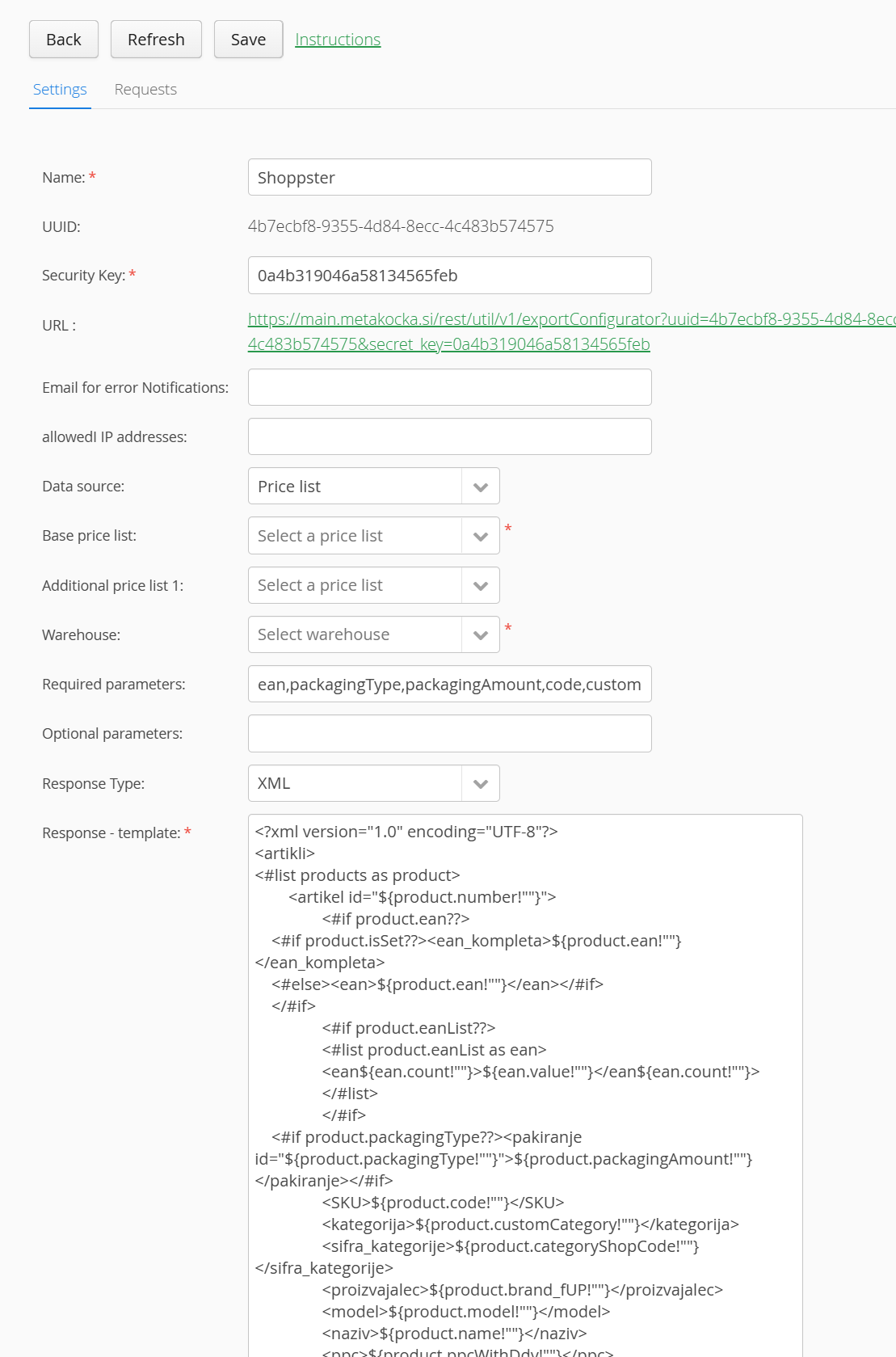
The following can be set for individual export configuration:
Name
Name of the connection that is displayed only in the list of connections. This can be set up to your preference.
UUID
A unique identifier that is used in the URL address for identifying an exchange. Prepared automatically for new exchange and cannot be changed.
Security key
Security key that is used in the URL address for exchange authentication. Prepared automatically for new exchange and cannot be changed.
URL
Web link that is used to access the exchange printout. This URL is shared with BigBang and contains data that is requested by them.
E-mail address for reporting errors
If an error occurs during the generation of the exchange printout, an e-mail will be sent with the error(s) to the provided e-mail address. Multiple e-mail addresses can be provided, separated by commas. E-mail can be sent up to 5 times a day.
Example of usage: requested data is missing from the particular product when the URL sent is opened by BigBang leading to receiving all errors occurring in the generated data.
Permitted IP addresses
For extra security, you can enter the IP address from which the access to data (located in the shared URL address) is authorized
Data source
Indicating from where the data will be read Izbira iz kje se berejo podatki za generiranje izpisa izmenjave.
General price list
If the price list as the data source is selected, one or more price lists, from which the products will be read, should be selected. Only sales price lists are displayed. If multiple price lists have the same product, such a product will be taken into account from the first price list.
Additional price list 1
If the price list as the data source is selected, the option for additional price list selection is available. Displayed are purchase and sales price lists. This price list serves only as a supplement to the basic price list. If an additional price list has identical products to the basic one, for such products, prices from additional price lists are used as supplements. The appropriate example would be discounted or purchase prices.
Warehouse
One or multiple warehouses should be selected from which the product stock will be read.
Requested parameters
All parameters mandatory for exchange are entered here, separated by a comma. Such are entered automatically but can be still changed. If products are printed out and some of them do not fulfill all the parameters, such a product will not be added to the printout, and an error will be reported for that product, which will be received by e-mail.
Optional parameters
All parameters that can be optional for exchange are entered here. If products are printed out and some of them do not fulfill all parameters, the notification indicating that parameters are missing for that product will be displayed. The product will still be added to the final printout. Optional parameters are available in the List of parameters table below.
Response - type
Type of template which will be displayed. (JSON, XML, Text)
Response - template
Automatically generated when the new template is added.
Here, the template for the exchange in the type selected above must be entered. The template must be filled in in the FreeMarker style and parameters from their respective list above must be used.
Error - template
Automatically generated when the new template is added.
Here, the error template for the exchange in the type selected above must be entered. The template must be filled in in the FreeMarker style and parameters from their respective list above must be used. This template will be displayed in case of errors when generating the exchange printout.
Additional settings
MetaKocka support can set additional settings as well:
Calls limit
Indicating how many calls can be made during the day. The default value is 100. If a higher value is needed, contact our support.
Parameters list
The following parameters can be used in the template.
| Parameter | Meaning | Extra column ID |
| company_title | Name of your company | |
| products | List of products from a selected price list | |
| product.number | Consecutive number of the product in the provided list | |
| product.id | MetaKocka product ID | Mee |
| product.name | Product name | |
| product.code | Product code | |
| product.ean | Product bar-code | |
| product.description | Product description | |
| product.packedAmount | Quantity per package | |
| product.packagingAmount | The number of products belonging to a set. By default it is 1, automatically it is set to more, if the products belonging to a set are already in the selected price list. | |
| product.isSet | True/False, if the product belongs to a set | |
| product.eanList | Bar-code list of products in the set | |
| ean.count | Consecutive number of the barcode of the product belonging to a set | |
| ean.value | Product bar-code in the set | |
| product.brand | Product brand | |
| product.brand_fUP | Product brand - uppercase letters | |
| product.largeImg | Large picture | slika_velika |
| product.smallImg | Small picture | slika_mala |
| product.extraImg1 | Additional picture 1 | dodatna_slika_1 |
| product.extraImg2 | Additional picture 2 | dodatna_slika_2 |
| product.extraImg3 | Additional picture 3 | dodatna_slika_3 |
| product.extraImg4 | Additional picture 4 | dodatna_slika_4 |
| product.imagesComma | A merged sequence of pictures separated by a comma. A sequence is created based on the picture fields above. What is entered in the ''Large picture'', will always be at the beginning of the list. | |
| product.images | List of additional pictures only. Each picture has its own number and URL in the list. | |
| image.number | Number of additional picture | |
| image.url | URL of additional picture | |
| product.url | URL | url |
| product.sellerUrl | Producer web page | spletna_stran_proizvajalca |
| product.instructions | Instructions | instructions |
| product.packagingType | Packaging type | product_packaging_type |
| product.categoryShopCode | Category code of the online store | webshop_category_code |
| product.model | Model | product_model |
| product.attributes | Attributes - Example of record "Color=Black;Size=M;..." | product_attributes |
| attribute.id | "Color" from the example above | |
| attribute.value | "Black" from the example above | |
| product.energySticker | Energy sticker | energy_sticker |
| product.productPaper | Product paper | product_paper |
| product.securityPaper | Security paper | security_paper |
| product.benefit | Benefit | product_benefit |
| product.supplyDate | Supply date (days) | product_supply_date |
| product.groupId | ID of product group | product_group_id |
| product.warranty | Warranty | product_warranty |
| product.customCategory | Category | product_category |
| product.discount | Discount from the price list. Column "P(%)" | |
| product.discount_fSI | Discount from the price list. Column "P(%)". A decimal separator is a comma. | |
| product.ppc | PPC from the price list. Column "PPC" | |
| product.ppcWithDiscount | PPC with the discount included | |
| product.ppcWithDdv | PPC with tax from the price list. Column "PPC with VAT" | |
| product.ppcWithDdv_fSI | PPC with VAT from the price list. Column "PPC with VAT". A decimal separator is a comma. | |
| product.ppcTaxFactor | PPC VAT from the price list. Column "PPC VAT (%)" | |
| product.ppcExtra | PPC with the included discount from the additional price list | |
| product.netPriceExtra | Net price from additional price list | |
| product.netPriceWithDiscountExtra | Net price including discount from the additional price list | |
| product.grossPriceExtra | Price with VAT from additional price list | |
| product.netPrice | Net price from the price list. Column ''Price''. | |
| product.netPrice_fSI | Net price from the price list. Column ''Price''. The decimal separator is a comma. | |
| product.taxRate | VAT from the price list. Column "VAT (%)" | |
| product.category | Sequence of categories. The sequence is composed of all categories that are selected for the product. A comma separates categories. | |
| product.properties | List of categories, which are denoted as properties. This is set only through activated functionality ''Enaa category'' | |
| property.value | Category name | |
| property.title | If there is a superior category, otherwise category name | |
| product.stock | Stock status displayed with ''0'' or ''1'' | |
| product.stockText | Stock status displayed with "In stock" or "Out of stock'' | |
| product.stockTextYesNo | Stock status displayed with "yes" or "no" | |
| product.stockAmount | Stock quantity | |
| product.nonNegativeStockAmount | Stock quantity. If the stock is lower than 0, the value is set to 0. | |
| product.reservationAmount | Stock quantity | |
| product.stockWithReservationAmount | Stock quantity including reservations | |
| product.stockWithReservationAmount_fSI | Stock quantity including reservations. The decimal separator is a comma. | |
| product.stockWithReservationAmountTextYesNo | Stock status including reservations displayed with "yes" or "no" | |
| product.length | Length | |
| product.length_fSI | Length. The decimal separator is a comma. | |
| product.width | Width | |
| product.width_fSI | Width. The decimal separator is a comma. | |
| product.height | Height | |
| product.height_fSI | Height. The decimal separator is a comma. | |
| product.weight | Gross weight | |
| product.weight_fSI | Gross weight. The decimal separator is a comma. | |
| product.weight_net | Weight | |
| product.weight_net_fSI | Weight. The decimal separator is a comma. |
Certain parameters have a value recorded for the ''Extra column ID'' column. This means that such a column is an additional one since it does not exist by default in MK. It should be added by using the ID and name from the ''Meaning'' column.
Requests overview
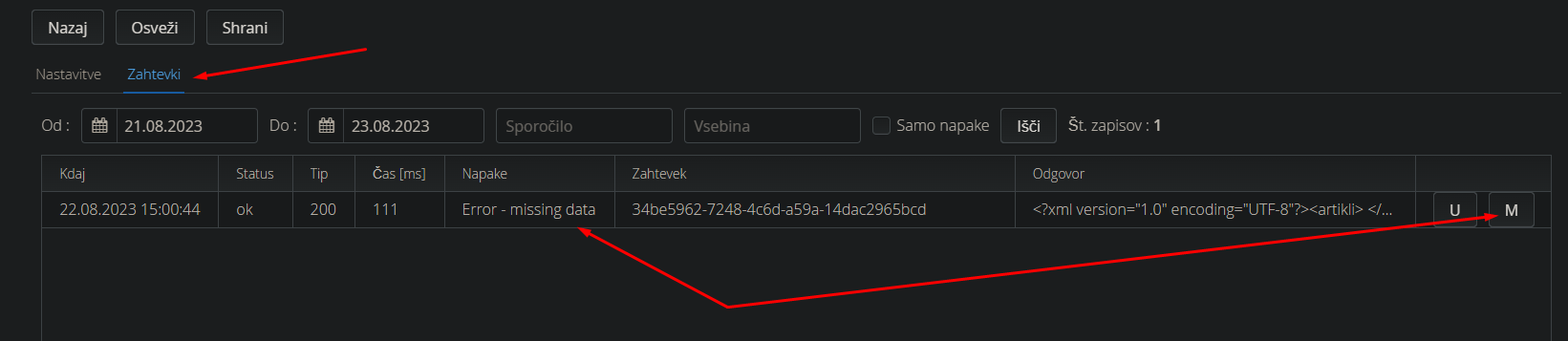
Previous requests can be visible in Additional settings -> Export configuration -> "Select export" -> Requests. Errors occur if requested parameters are set in the configuration but such are not completely fulfilled by at least one product. In the ''Error'' column, the following message will be displayed ''Error - missing data'', since the product was not added to the printout. The parameters missing can be found by pressing the ''M'' button, or in case of having a lot of errors, click on the row and then double-click on the ''Download'' button. The same procedure applies to optional parameters, the only difference is that the type of error is - ''Warning - missing data'', while the product will still be included in the printout.
Errors which are the consequence of the requested parameters missing will also be sent to the e-mail address (limit is 5 e-mails per day) if one is entered in the configuration.
Was this article helpful?
That’s Great!
Thank you for your feedback
Sorry! We couldn't be helpful
Thank you for your feedback
Feedback sent
We appreciate your effort and will try to fix the article