
Data exchange with accounting
Data exchange - Cut-off date
In the data export request for accounting programs, entering the date from - to according to which MK will search for appropriate documents is required. The following settings are used to determine how the entered date is taken into account when reading document data:
| Name | Department | Received? | Description | Date for a tax book | |
| (1) Invoice date | bill_date | Purchase, Sales | Invoice date | Invoice date | |
| (2) Date of perf. service or invoice date | service_bill_date_exact | Sales | Date of perf. service. If not provided, invoice date. | Date of perf. service. If not provided, invoice date. | |
| (3) Date of perf. service before the invoice date | service_bill_date | Purchase, Sales | Sales | If the date of perf. service is provided and is before invoice date, then date of perf. service is taken into account. Otherwise, the invoice date is taken into account. OR Date of perf. service is before the cut-off date and the invoice date is within the cut-off date | Invoice date |
| (4) Invoice receipt date before the invoice date | bill_received | Purchase | Purchase | Invoice receipt date. If not provided, invoice date. | Invoice date |
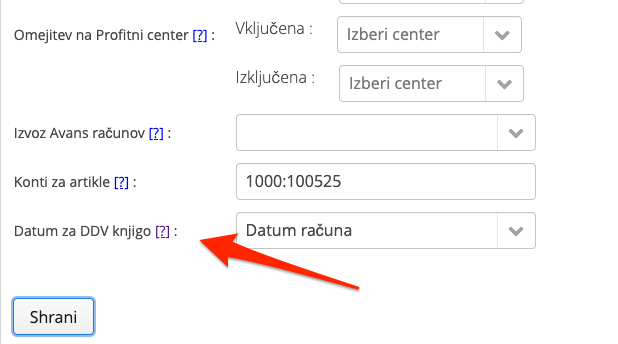
Change of date for tax book
Note: supported only by Vasco
If invoices should be exported based on the invoice date, while the service date will be used as the date for the tax book, this can be configured using the option below in Settings.
Was this article helpful?
That’s Great!
Thank you for your feedback
Sorry! We couldn't be helpful
Thank you for your feedback
Feedback sent
We appreciate your effort and will try to fix the article