
Stock Check and Order Status Update
Metakocka now checks stock for received orders every hour. If sufficient stock is available, the order status is automatically changed to Ready to ship, and the order becomes visible in the Fulfillment application.
You also have the option to set the system to check stock immediately when an order is received in Metakocka. If the item is in stock, the order status is instantly updated to Ready to ship.
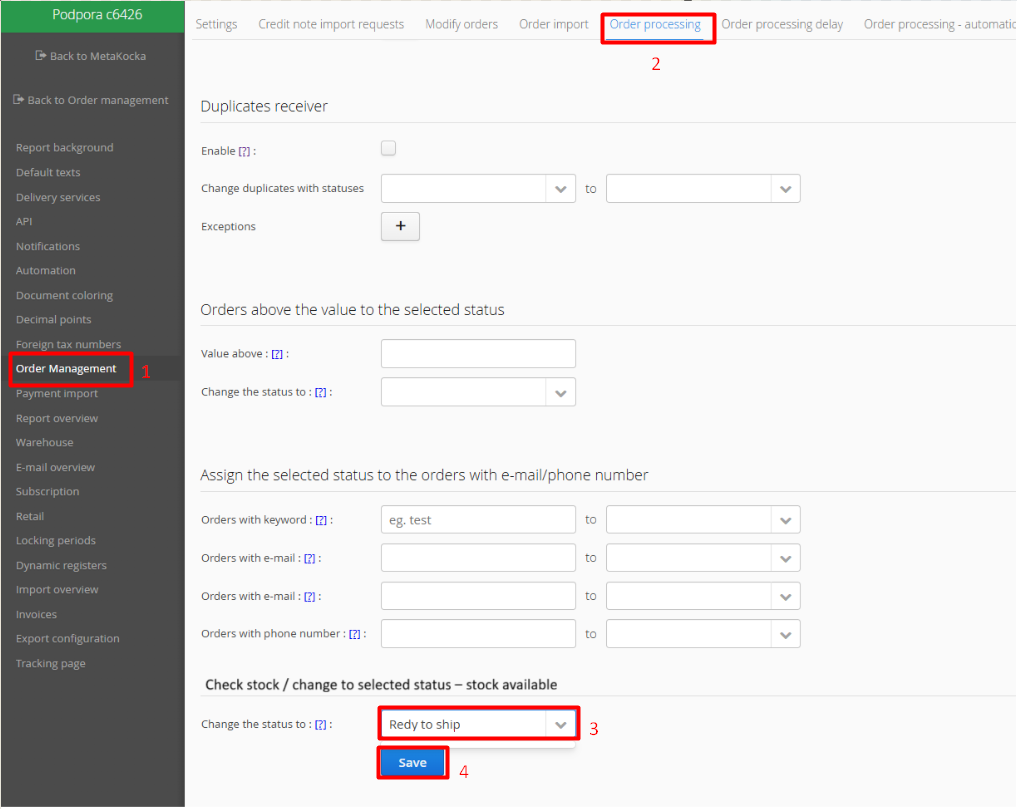
You can configure this setting in the additional settings of your client's company:
1 Order management
2. Order processing
3. Under the option Check stock / change to selected status – stock available, select the status Ready ship
Was this article helpful?
That’s Great!
Thank you for your feedback
Sorry! We couldn't be helpful
Thank you for your feedback
Feedback sent
We appreciate your effort and will try to fix the article